✦
THE LIFESTYLEMINE NEWSLETTER
Simple wellness tips, healthy recipes, and
everyday inspiration delivered to your inbox.
Your Email Address
Quick Answer: A walking pad helps full-time remote workers, hybrid workers, and anyone in a sedentary desk job who can’t seem to rack up steps. They do less for people who already work active jobs, walk a long commute, or take regular movement breaks. The benefit is movement, not cardio fitness.
Before you buy a walking pad, answer three questions honestly.
Do you log fewer than 5,000 steps on a typical workday? If yes, a walking pad will change your daily activity in a way you’ll notice. If you already walk 8,000+ through a commute, errands, or lunch walks, the extra benefit shrinks fast.
Can you work on a screen while walking at 1–2 mph? Most people can type at 1.5 mph after a short adjustment. Calls and meetings carry over almost instantly. Detailed writing or creative work is harder for some, easier for others. The first week has a real learning curve.
Do you have a desk at the right height? A walking pad without a standing desk is barely usable. A normal seated desk puts your walking posture all wrong, and your back and neck will let you know. No standing desk means you need to budget for one alongside the pad.
The people who get the most out of it tend to live in back-to-back video calls they can walk through, or spend hours reviewing documents, reading email, and handling async messages. The ones who abandon it are usually doing deep creative work where breaking and restarting flow is expensive.
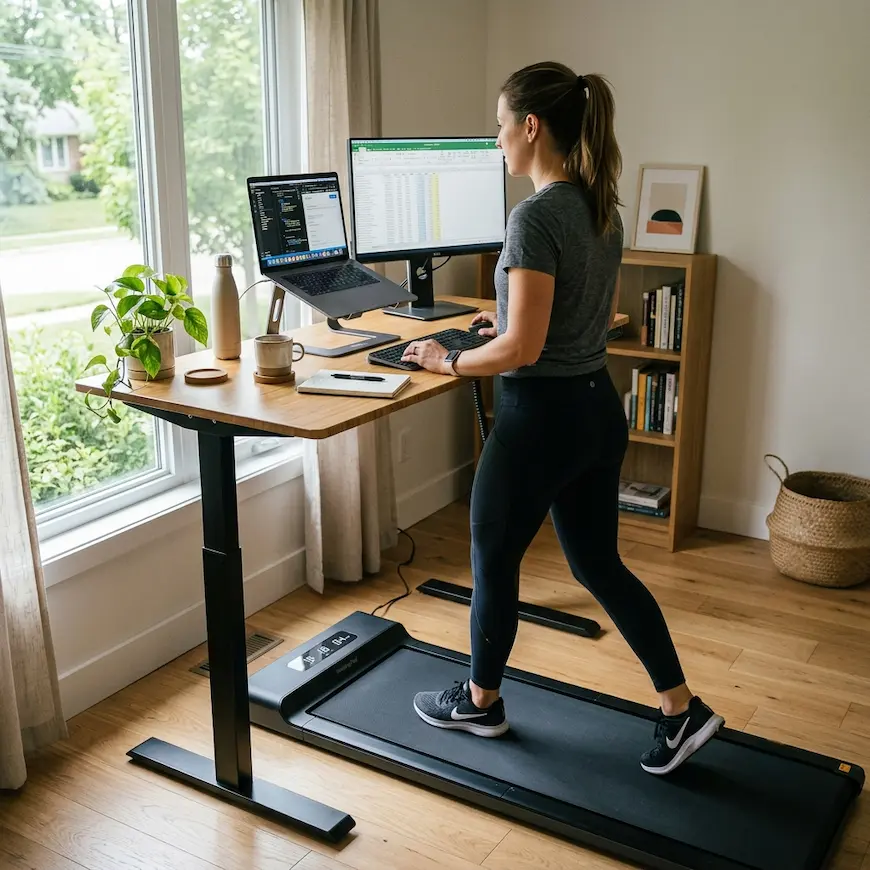
Quick Answer: The setup that works is a foldable walking pad under a standing desk, set at a height where you can type with relaxed shoulders. The desk surface should sit at elbow height with your arms down and slightly bent, usually 2–4 inches above your seated typing height.
Getting this right is the difference between using a walking pad for months and letting it gather dust.
Desk height. When you walk, your arms swing a little more than when you sit. Set the desk so your elbows land near 90 degrees with your hands on the keyboard, usually 2–3 inches above your seated typing height. Shoulders tense after 20 minutes? Drop it slightly.
Monitor position. Your eye line should hit at or just below the horizon. Staring down at a laptop on the desk is the fastest route to a sore neck. An external monitor, or a laptop stand plus an external keyboard, fixes it.
Cables. A walking pad shifts a little while you use it, even foldable ones. Keep power cables behind and clear of the belt. If cables run along the floor, tie them to the desk legs before your first walk.
Shoes. Nobody mentions this in buying guides. Walking in socks on the belt is fine for ten minutes and miserable at forty-five. Wear shoes. Low-profile athletic shoes beat thick-soled trainers, which feel wobbly at low speed.
Noise. Most pads run 40–60 decibels at 1.5–2 mph, quieter than an air conditioner. They’re audible on calls if your mic sits right on the desk, though most earbud and headset mics with noise cancellation handle it. Test before anything important.
For the rest of the ergonomics, the Occupational Safety and Health Administration’s computer workstation checklist at osha.gov covers monitor height, wrist position, and standing height targets.
Quick Answer: A walking pad trades speed (3–4 mph vs. 12+), incline (flat vs. 0–15%), and durability for a compact footprint, a quiet motor, and a price roughly 60–80% below a decent home treadmill. For desk walking, it does everything a treadmill does. For real cardio training, it doesn’t.
feature
walking pad
traditional treadmill
max speed
3–4 mph
10–12+ mph
incline
usually flat
0–15%
motor power
1–2 HP
2.5–4 HP
weight capacity
220–300 lbs
250–400 lbs
footprint
~50″ x 20″ folded
~70″ x 30″
noise level
40–55 dB
60–75 dB
price range
$200–600
$600–2,500+
best for
desk walking, steps
cardio, running, incline
The vs.-treadmill debate mostly misses the point. They’re different tools. If you want to walk through meetings and stack up steps, the walking pad wins on noise, size, and price. If you want to run intervals or train on an incline, only a treadmill does that.
The biggest day-to-day difference is noise. A walking pad at 2 mph in a home office is background sound. A treadmill at the same speed is clearly louder, because its motor is built for heavier loads. In an apartment or shared space, that gap matters.
Quick Answer: The first three days feel awkward. Typing at 1.5 mph takes more focus than you’d expect. By days 5–7 it goes automatic and you stop noticing. Calls and reading feel natural almost immediately; focused writing and detailed spreadsheet work take longer.
Week one was humbling. I set the walking pad to 1.5 mph, opened my email, and felt like I was relearning how to walk and talk at the same time. My typing accuracy dropped, I reread sentences, and I kept clipping the edge of the belt.
By day four it clicked. The movement faded into the background and the mental effort of walking slowly dropped to about zero. My experience isn’t a controlled trial, though, and the research is more mixed than the wellness posts suggest. A 2015 study had people walk at 1.5 mph on a treadmill desk while doing typing and memory tasks; the walkers typed a bit slower and scored slightly lower on a couple of attention and learning measures than people sitting, though performance stayed in the normal range (Larson et al., 2015 ).
The study ran in a single session, so whether people fully adapt over weeks is still an open question. My own answer, for what it’s worth, is that the dip is real on day one and mostly gone by the end of week one.
What carried over to walking right away:
Video calls where I’m mostly listening
Reviewing documents and email
Brainstorming where I’m not typing constantly
Training videos and podcasts during light tasks
What took longer:
First drafts that need sustained focus
Spreadsheet work with lots of clicking and data entry
Anything that needs reading and typing at full speed at once
For me, 60–70% of the workday turned out to be walk-compatible once the adjustment passed. The other 30–40%, the deep-focus stuff, is better done sitting or standing still.
If you want to round out the home-office picture, the best-seat-cushion guide covers the seated and standing phases of the day.
Read also: Best Home Office Setup for Productivity and Focus
Quick Answer: The WalkingPad A1 Pro is the usual entry point for home-office workers: folds flat, runs quietly, handles up to about 220 lbs. For heavier users or all-day use, the LifePro Pacer Pro takes more sustained load. The UREVO 2-in-1 is the true budget option if you want to test the habit first.
There are dozens of walking pad brands now, and most run the same handful of motor and belt configurations from the same Chinese factories. What actually differs is build quality, weight capacity, app connectivity, remote design, and warranty support.
Entry level ($200–350)
1. UREVO 2-in-1 Folding Treadmill (Check on Amazon ): quiet at low speeds, rated to 265 lbs, small remote. The belt runs a little short, which taller users notice. Good for testing the walking pad habit before you commit.
Mid-range ($300–450)
2. LifePro Pacer Pro (Check on Amazon ): higher weight rating at 300 lbs, quieter than the A1 Pro at speed, slower fold mechanism. The better pick if you plan to walk 4–6 hours a day.
The one spec to check before you buy is weight capacity. Most budget pads are rated to 220 lbs but last longer if you stay 20–30 lbs under the max.
Quick Answer: At 1.5 mph most people take 100–120 steps a minute, so a 30-minute session is roughly 3,000–3,600 steps. Four of those across a workday lands around 12,000–14,000. Most users average 8,000–10,000 on days they use the walking pad, versus 2,000–3,500 on seated days.
The math is simple and encouraging.
At 1.5 mph:
30 minutes ≈ 3,000–3,600 steps
1 hour ≈ 6,000–7,200 steps
2 hours across a day ≈ 12,000–14,400 steps
At 2.0 mph:
30 minutes ≈ 4,000–4,800 steps
1 hour ≈ 8,000–9,600 steps
Those are real numbers. For context, a 2019 study in JAMA Internal Medicine followed about 16,700 older women and found that mortality dropped as daily steps rose, then leveled off around 7,500 steps a day, well under the usual 10,000 target (Lee et al., 2019 ). And that 10,000 figure was never a research finding in the first place: it traces back to a 1965 Japanese pedometer marketed as Manpo-kei, literally “10,000-step meter,” not to any study (Tudor-Locke & Bassett, 2004 ).
Practically, treat a walking pad as a step-accumulation tool, not a calorie burner. At 2 mph, a 150-pound person burns maybe 4–5 calories a minute, or 240–300 an hour. That adds up over months, but it isn’t the reason to buy a walking pad.
The reason to buy a walking pad is to close the gap between the movement your body expects and the movement a desk job gives you. Adding 5,000–8,000 steps to otherwise sedentary days, consistently, is a meaningful health habit over time. If you’re building daily movement habits around working from home, the walking habits guide covers the longevity research in more depth.
Quick Answer: Yes, with two conditions: you need a standing desk to use it properly, and you have to push through the first awkward week. After 60 days I average 9,200 steps on workdays versus 2,800 before. My afternoon energy is noticeably better, and I stopped reaching for caffeine after noon. I’d buy it again.
Here’s what changed and what didn’t.
What changed. My average workday step count went from 2,800 to 9,200. I changed nothing else: same schedule, same exercise outside work, same diet. The only new variable was the walking pad running during calls and light-task hours.
My afternoon energy improved, which I didn’t expect. The 2pm crash I’d had for years got milder within a couple of weeks. I still have low-energy stretches, but the drop is less of a cliff. Whether that’s the movement, the reduced sitting, or better circulation through the day, I can’t say for sure.
I stopped feeling restless at the desk. Before, I’d get up every 30–40 minutes out of plain discomfort. Now I can work in longer stretches without that itch to stand and pace.
What didn’t change. My weight. Two months of an extra 6,000 steps a day produced no visible weight loss, which wasn’t a surprise: the calorie burn at 2 mph is modest, and I didn’t touch my diet. If weight loss is the goal and nutrition isn’t part of the plan, adjust your expectations.
My cardio fitness, either. Resting heart rate and my performance in actual workouts stayed flat. Walking at 1.5–2 mph isn’t cardiovascular training. It’s movement, and those are different things.
The verdict: for a sedentary desk worker, a walking pad is one of the better returns on the time it costs, because the walking pad costs almost none. With a walking pad you’re turning hours you already spend at the desk into movement. Same output, meaningfully different physical input.
Quick Answer: Check weight capacity (stay 20 lbs under the max for longevity), measure your desk height (you need a standing desk 2–3 inches above seated height), and test noise against your call setup. Warranty support from Chinese brands varies; WalkingPad and LifePro have the most reachable customer service for US buyers.
The details that matter most:
Weight capacity. Most models are rated 220–265 lbs. Budget motors and belts start to strain above roughly 80–85% of the rating under daily use. Close to the limit? Go up a tier.
Belt length. Strides vary a lot. Taller users (6ft+) often find compact belts too short. Look for at least 47 inches for comfortable walking at 2+ mph.
Speed control. Some pads use a physical remote, some a foot-press sensor (step to start and stop), some a phone app. The remote is the most reliable day to day. The foot sensor is elegant but takes practice.
Noise floor. Apartment dwellers should look for models sold specifically as quiet, with published decibel ratings. The quietest run 40–45 dB at low speed. Anything above 55 dB at 2 mph will show up on calls without noise-canceling headphones.
Warranty. Most pads ship with a 1-year parts warranty. LifePro offers phone support; WalkingPad (KS Fitness) does email and chat. Avoid no-name brands with no verifiable warranty.
Garmin Vivosmart 5 fitness tracker (Check on Amazon ): for counting steps without trusting the walking pad’s built-in counter, which tends to undercount soft steps.
Before you buy, the digital detox and home office focus guide covers how your home setup shapes your energy and focus across the day.
A walking pad is a compact, low-profile treadmill made to slide under a standing desk and run at walking speeds only (0.5–4 mph). The walking pad has a shorter belt, a quieter and weaker motor, and no incline. A traditional treadmill hits 12+ mph, has incline, and is built for running. The walking pad is much quieter, smaller, and cheaper. Want to walk while you work? The walking pad does it. Want to run? It doesn't.
For a sedentary desk worker logging under 5,000 steps on a typical day, it's one of the better lifestyle buys in the $300–500 range, because it converts time you already spend at the desk into movement with no added time cost. For people who already move plenty through a commute, exercise, or an active job, the extra benefit is smaller and may not justify the price.
Most people settle around 1.5–2.0 mph for working while walking. There your stride stays relaxed, your hands can type, and your breathing doesn't wobble your voice on calls. Above 2.5 mph you have to think about walking and typing gets noticeably harder. Start at 1.2 mph and add 0.2 mph through the first week.
Most have rubber feet or a base pad that protects hardwood and tile. The walking pad sits flat and doesn't need anchoring. The main risk is scuffing from dragging it around; most have transport wheels for that reason. Carpet cuts vibration slightly but can make the walking pad slide less smoothly when you fold it away.
They work with any desk that raises to standing height. The key dimension is that the surface reaches 38–44 inches off the floor when you walk (depending on your height), 2–4 inches above most people's seated height. Most electric standing desks cover that. Fixed seated desks don't.
With the desk and monitor set right, regular use tends to ease the forward-head, rounded-shoulder posture that long seated stints cause. Movement keeps the hip flexors from tightening and nudges you toward a more upright spine. Set it up wrong, though (desk too low, monitor off eye level) and you can create new problems. The setup matters as much as the walking pad itself.
Mimo Karam is the founder and writer at LifestyleMine. She writes about daily habits, nutrition, sleep, and emotional wellness, turning research into practical advice for people who want to live healthier without making it complicated.