✦
THE LIFESTYLEMINE NEWSLETTER
Simple wellness tips, healthy recipes, and
everyday inspiration delivered to your inbox.
Your Email Address
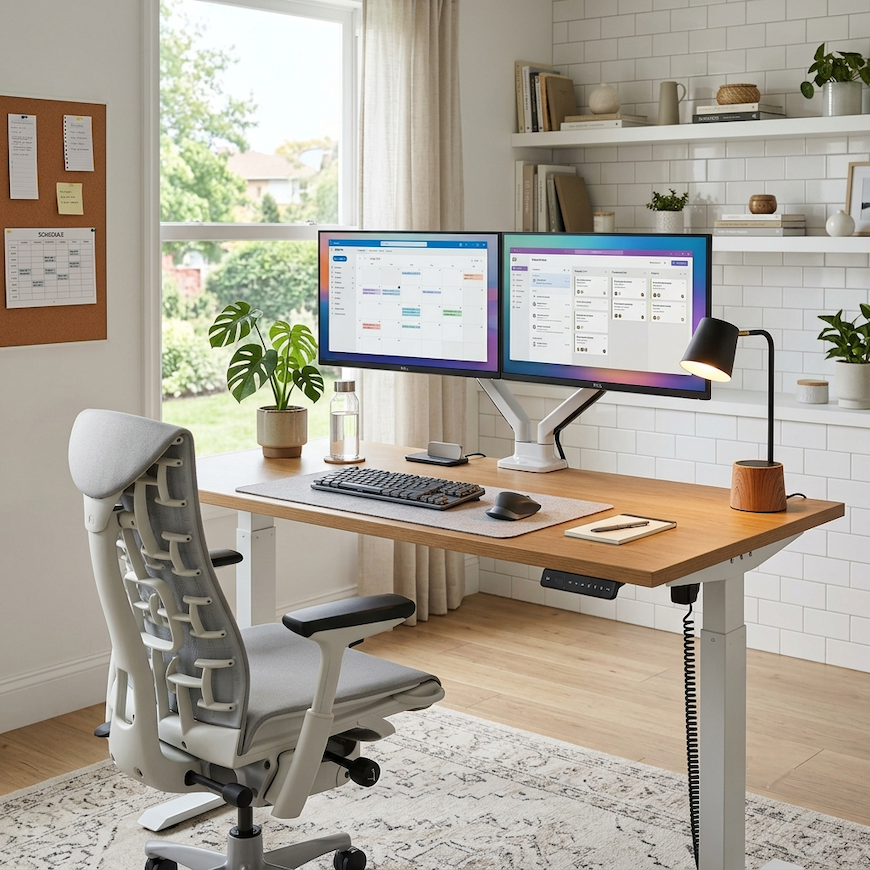
Chair configuration, in order of impact:
1. Seat height. Feet flat on the floor, thighs parallel to it, hips, knees, and ankles all near 90°. If your feet do not reach the floor at the right seat height, use a footrest. Do not drop the chair until your thighs angle downward.
2. Lumbar support. Set it at the natural inward curve of your lower back, around belt level. You should feel gentle contact, not pressure. A chair with no adjustable lumbar positioning cannot be set up correctly for most body types.
3. Armrests. At elbow height with shoulders relaxed and elbows at 90°. Armrests set too high hike your shoulders and load the trapezius and levator scapulae nonstop. Too low and you lean to one side, loading the spine sideways.
4. Seat depth. Leave 2–3 inches between the back of your knees and the front edge of the seat. You should be able to sit fully back against the backrest without pressure behind the knees, which would cut off circulation.
5. Backrest angle. A slight recline of 95–105° eases lumbar disc pressure compared with a bolt-upright 90°. Sitting perfectly straight is not the ideal; a modest recline is.
Desk and monitor:
Monitor: top of the screen at or just below eye level; 20–24 inches from your eyes; a slight rearward tilt (10–20°) to reduce neck bending
Keyboard: directly in front, at elbow height; wrists flat or angled slightly down toward the keys
Mouse: at the same level as the keyboard, as close to your body as possible; do not reach forward or out to the side for it
Amazon products:
Branch Ergonomic Office Chair [Check Price on Amazon ] The Branch chair gives you adjustable lumbar support, seat depth adjustment, armrest height control, and a mesh back for airflow, features you usually see in chairs priced at $500 and up. The fully adjustable ergonomic chair at this price point on Amazon. The mesh back cuts the heat buildup that causes fatigue in long sitting sessions. The best home office setup pays you back in fewer aches and steadier focus.
Ergotron LX Single Monitor Arm [Check Price on Amazon ] A monitor arm lets you change height instantly as you move from sitting to standing, and it places the screen at exactly the right distance and eye level no matter how deep your desk is. The Ergotron LX handles monitors up to 34 inches and 15 lbs, with full tilt, swivel, and rotation.
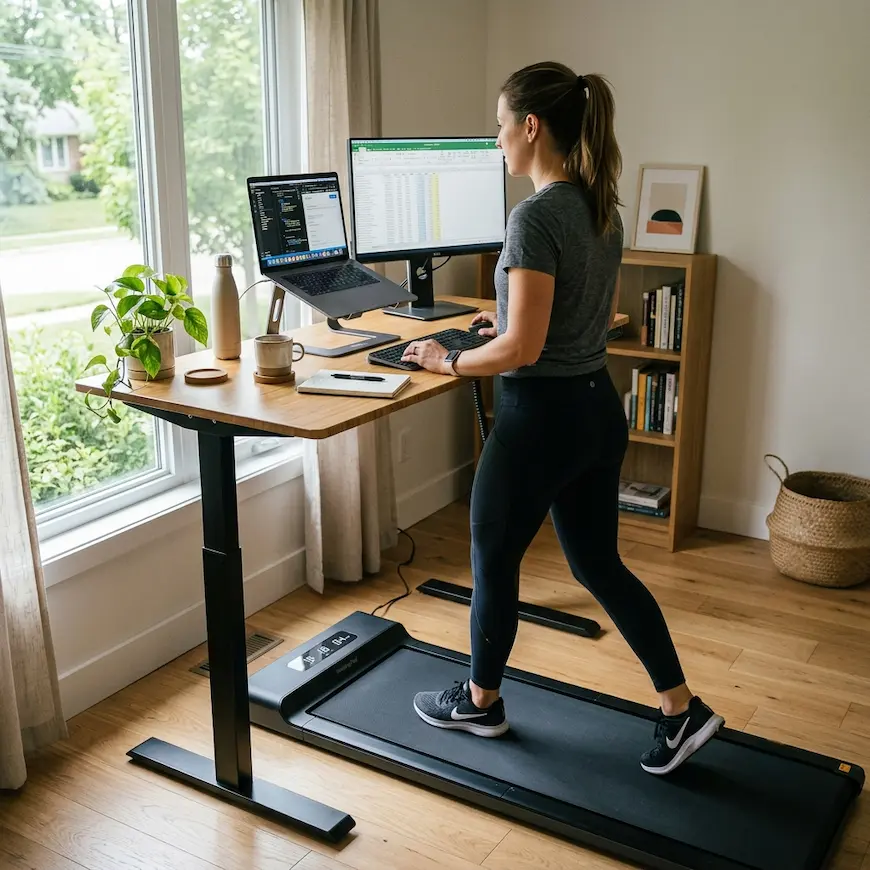
Quick Answer: Standing desks cut down prolonged sitting and its health risks, but the goal is not to stand all day. It is to switch between sitting and standing every 30–60 minutes. The Take-a-Stand Project (Pronk et al., 2012) provided sit-stand workstations to office workers with sedentary jobs and found reduced sitting time along with better self-reported energy, less upper back pain, and improved concentration over four weeks. The most common mistake is standing too long too soon, so build up gradually with 15–30 minute intervals.
Standing desk research took off after epidemiological data linked prolonged sitting to cardiovascular disease, type 2 diabetes, and all-cause mortality. The practical question is not whether standing desks help, since the evidence that they do is clear, but how to use one well. The best home office setup tends to be quiet about how much it helps.
The Take-a-Stand Project (Pronk et al., 2012) was a practice-based study in Minneapolis of 34 workers with sedentary jobs. The intervention group (24 people) got a sit-stand device for a four-week period; the comparison group (10 people) did not. The intervention reduced sitting time and produced improvements in upper back and neck pain, energy, mood, and self-reported concentration, with no drop in work output (Pronk et al., 2012 ). A good rule of thumb for the best home office setup is to fix the source, not the symptom.
Key principles for using a standing desk well:
The 30/30 target. Aim to stand at least 30 minutes per hour of work. Build up over 2–3 weeks, because long standing right away brings on foot and lower-leg fatigue. Start with 15-minute standing intervals and add 5 minutes a day.
Anti-fatigue mat. Standing on a hard floor for more than 30 minutes brings on steady lower-body fatigue. A textured anti-fatigue mat nudges you into small weight shifts and micro-movements that keep circulation going. Once you are standing for more than 30 minutes at a stretch, it stops being optional.
Monitor height has to change with position. Most people set the monitor for sitting and then stand, which forces them to look down and loads the cervical spine exactly as before. Set the monitor arm to move when you do; the top of the screen should stay at or just below eye level in both positions.
Which tasks suit standing. Stand for calls, document review, and light reading; sit for heavy keyboard work and detailed analysis that needs fine motor precision. Standing is a poor fit for anything requiring very precise hand control.
Electric versus manual crank. Manual crank desks cost $200–$350 but take 30–60 seconds to adjust, and that friction sharply cuts how often you actually change positions. Electric desks ($400–$900) move in 3–7 seconds and you switch far more often. Over months of daily use, that behavioral gap is large.
Amazon products:
Flexispot E6 Bamboo Electric Standing Desk [Check Price on Amazon ] Dual motor with 355 lb capacity; adjusts from 22.8 to 48.4 inches (fits heights from 4’6″ to 6’8″); 4-memory preset keypad; 10-year frame warranty. The Flexispot E6 is the most stable and consistently well-reviewed standing desk. The best home office setup adapts to how you actually work.
FEZIBO Electric Standing Desk (55 inch, budget option) [Check Price on Amazon ] Full desk with top included. Dual motor, 3-year warranty, memory presets. The best way into the standing desk category without the premium price. A bit less stable than the Flexispot E7 at full height but fine for most users under 6’2″. Most people picture the best home office setup as gadgets, when it is really ergonomics.
Quick Answer: The most important lighting variable in a home office is color temperature. Cool white (5,000–6,500K) raises alertness and suits work hours; warm white (2,700–3,000K) lowers alertness and belongs in the evening. Natural light to the side of your monitor is ideal, not behind it (glare) and not in front of you (squinting). Too little ambient light around the monitor forces constant pupil adjustment that produces digital eye strain over hours.
Viola and colleagues (2008) compared blue-enriched white light (17,000K) with standard 4,000K white light in an office over four weeks and found clear gains in self-reported alertness, performance, and sleep quality, plus less evening fatigue, which suggests workplace lighting feeds directly into the circadian system through the workday (Viola et al., 2008 ). The best home office setup removes friction you stopped noticing long ago. Fundamentals, not gadgets, make the best home office setup.
Natural light positioning. Put your desk perpendicular to the window so light hits the monitor from the side. Light from behind the monitor throws glare onto the screen; light in front of you (facing a window) makes you squint. If the layout forces a window behind you, use a monitor hood or an anti-glare screen protector.
Ambient room light. The room light should be bright enough to shrink the gap between your screen and the space around it. Working in a dark room with a bright screen makes your pupils constantly adapt between two light levels, and that ongoing adjustment causes cumulative eye strain no matter what your screen settings are. Use daylight-balanced bulbs (5,000–6,500K) during work hours.
Desk lamp. A lamp with adjustable color temperature lets you match the light to the time of day: cool white (5,500–6,500K) from morning into early afternoon, then warmer tones (3,000–4,000K) in late afternoon so you are not suppressing melatonin before bed.
Monitor settings. Turn on Night Shift (macOS/iOS), Windows Night Light, or f.lux to shift the screen warmer in the 2 hours before your planned sleep. Set monitor brightness to match the room light; a very bright screen in a dark room is one of the most consistent eye strain drivers.
20-20-20 rule. Every 20 minutes, look at something 20 feet away for 20 seconds. This resets your focal length and eases the ciliary muscle fatigue that builds up from staring at a close screen.
Amazon products:
BenQ ScreenBar Plus Monitor Light [Check Price on Amazon ] The ScreenBar Plus clips onto the top edge of any monitor and lights the desk without throwing glare on the screen, because it shines down and forward and cannot reflect off a vertical monitor. A built-in ambient light sensor adjusts brightness to the room. It is the most purpose-built desk light for monitor work, and it skips the shadow and glare problems of a normal desk lamp. Every piece here feeds into the best home office setup as a system.
Quick Answer: The two technology upgrades that help both productivity and physical health most are an external monitor (24–27 inch minimum, at eye level) and a full-size keyboard at elbow height. Working off a laptop screen for hours forces a forward head tilt to see the low screen, which loads the neck. A laptop stand plus an external monitor costs under $100 and changes the ergonomic profile of any laptop setup.
The best monitor for a home office matters because screen real estate decides how much you can keep visible at once, which cuts the mental cost of window-switching that piles up across hundreds of small context changes a day. Comfort and focus are the real test of the best home office setup.
Monitor recommendations by use case:
Use Case
Recommended Size
Resolution
Notes
General knowledge work
27 inch
1440p (2560×1440)
Best balance of workspace and sharpness
Budget / starter
24 inch
1080p (1920×1080)
Adequate; upgrade the monitor arm regardless
Creative work / data
27 inch + 24 inch (dual)
1440p primary
Secondary monitor for references and tools
Video calls heavy
Any size
Add wide-angle webcam
A 1080p webcam matters more than monitor size
Keyboard. Laptop keyboards used for hours produce finger and wrist strain from short key travel and a forced wrist angle. A tenkeyless (TKL) keyboard shrinks the desk footprint and lets the mouse sit closer to your body. Low-profile scissor-switch keyboards (Logitech MX Keys) cut finger extension distance compared with mechanical keyboards, without giving up tactile feel.
Mouse. Most mouse-related strain comes from holding the forearm palm-down (pronated) for hours. Vertical mice (Logitech MX Vertical) let the arm rest in a neutral handshake position, which noticeably eases forearm and wrist strain for people who mouse a lot.
Internet connectivity. A wired ethernet connection, even a single Cat6 cable to your router, kills the packet loss and latency swings that cause call audio dropouts and screen-share lag. It is a $15 fix for the most common work-from-home tech complaint.
Amazon products:
Logitech MX Keys Advanced Wireless Keyboard [Check Price on Amazon ] Low-profile scissor switches with per-key backlighting; connects to three devices at once over Bluetooth or the Logi Bolt receiver; the backlight auto-dims when your hands leave the keys. Pairs with the MX Master 3S mouse for a full keyboard-and-mouse upgrade. It is the most consistently rated wireless keyboard for professionals. The best home office setup spends on seating and light before screens.
Lamicall Adjustable Laptop Stand [Check Price on Amazon ] For laptop-plus-external-monitor setups: it raises the laptop screen to serve as a second display at eye level, ending the two-screen height mismatch that causes head rotation and neck strain. Adjusts from 15° to 60° and folds flat. This is the highest ergonomic return of any single accessory for laptop users. Think of the best home office setup as an investment in sustained attention.
Quick Answer: Noise is the most commonly cited home office distractor. Noise-cancelling headphones (active noise cancellation, or ANC) are the fastest, most effective fix: good ANC drops low-to-mid-frequency ambient sound by 20–40 dB. For the room itself, the highest-return acoustic improvements are soft furnishings, including area rugs, heavy curtains, and upholstered furniture, which soak up sound reflecting off hard surfaces.
Noise-cancelling headphones have become standard professional gear for anyone working in a shared space. The reason they matter comes from cognitive science: an interruption from background noise does not just briefly break focus, it imposes a “resumption lag” that averages around 23 minutes before full focus returns. In a space with unpredictable noise, that cost compounds all day. The best home office setup keeps your neck, wrists, and eyes out of trouble.
Active noise cancellation versus passive isolation. ANC headphones sample ambient sound with microphones and generate an inverted waveform that cancels it in real time. That works best on steady low-to-mid frequency noise, including traffic, HVAC, and background conversation. For high-frequency, irregular sounds (a dog barking, a door slamming), the passive seal of the ear cup is the main barrier. The best work headphones pair strong ANC with a tight seal. Small, correct choices compound into the best home office setup over time.
Music during work, and what the research supports. The evidence here is mixed: instrumental music at moderate volume helps on creative tasks and simple repetitive ones, but it hurts performance on complex verbal tasks (writing, editing, reading dense material) because it competes for verbal working memory. A workable rule: ambient noise (brown noise, rain) or wordless music (lo-fi, classical, instrumental) for sustained focus; silence for writing and language-heavy analysis. The best home office setup looks unremarkable and feels effortless.
Room acoustics. Home offices with hard surfaces (hardwood floors, bare walls, glass) have long reverberation times, so voices echo and background sounds linger. Acoustic priority order:
Area rug, which absorbs floor reflection, the most common problem
Heavy curtains or drapes
Upholstered furniture (a bookshelf or couch) in the same room
Acoustic panels, only really needed for recording, podcasting, or very reflective rooms
Amazon products:
Sony WH-1000XM5 Wireless Noise-Cancelling Headphones [Check Price on Amazon ] Best-in-class ANC for 2025–2026. Up to 30 hours of battery; multipoint connection (two devices at once); Speak-to-Chat pauses audio when you talk; touch controls on the ear cup. The definitive work ANC headphone for people who wear them daily and want maximum performance.
Anker Soundcore Q45 Noise-Cancelling Headphones [Check Price on Amazon ] Budget alternative. Hybrid ANC with 40 dB of noise reduction and 50 hours of battery. Sound quality sits below Sony’s standard, but the ANC is competitive at the price. The right call for cost-sensitive buyers who still want real noise cancellation rather than passive isolation. What you remove matters to the best home office setup as much as what you add.
Quick Answer: Desk clutter is not just unpleasant to look at, it eats cognitive resources. Visual clutter competes for representation in the visual cortex and cuts the brain’s ability to give attention to the task in front of you. The best desk organization system is the one you can reset in under 2 minutes at the end of the day: anything not in active use goes in a drawer, on a shelf, or off the desk.
A work-from-home setup in a small space gets the most from aggressive vertical organization. The desk surface should hold three things only: active work materials, tools you use several times a day, and one personal object. Everything else belongs in a drawer, on a shelf, or out of the room. The best home office setup starts with the chair and works outward.
Cable management. Visible cable tangles are the most common source of desk clutter and a constant reminder of disorder. A three-step approach:
Velcro cable ties to bundle cables along their run; skip zip ties, which you have to cut to adjust
A cable management tray under the desk to hold the power strip and spare cable length out of sight
Cable raceways or braided sleeves for cables that have to run visible along the desk edge or wall
For standing desks specifically, use an adjustable cable spine that handles the vertical travel as the desk raises and lowers. This prevents cable wear and keeps things tidy through transitions. For the best home office setup, match the room to the task in front of you.
Desk surface organization:
Vertical desk organizer: stores documents, notebooks, and mail upright instead of in flat piles, which shrinks the footprint of paperDrawer pedestal: a rolling unit under the desk that keeps pens, chargers, headphones, and supplies handy without eating desk spaceMonitor riser with storage: for users without a monitor arm, it raises the screen to eye level and creates usable storage underneath
Amazon products:
Marbrasse Mesh Desk Organizer with Drawers [Check Price on Amazon ] Five-compartment mesh organizer with two small pull-out drawers. Holds pens, scissors, phone, charger, and odds and ends without surface clutter. One of the highest-impact-per-dollar desk accessories for surface organization. The best home office setup quietly protects your health during work hours.
JOTO Cable Management Sleeves [Check Price on Amazon] Neoprene sleeves that bundle several cables into one clean unit. For standing desks, the accordion-style version expands and contracts with desk height without binding. A pack, cable management delivers an outsized improvement in how the desk looks and cuts the trip hazard of trailing cables for very little money. Priorities, not price, build the best home office setup.
Quick Answer: One or two live plants within your field of view give a consistent, evidence-linked boost to mood and attention, not through dramatic air purification (which needs far higher plant density), but through the “soft fascination” idea in Attention Restoration Theory: natural elements provide gentle, effortless attention that lets directed focus recover. A pothos or ZZ plant on a shelf or desk corner needs water every 10–14 days and survives low light.
Plants and attention restoration. Kaplan and Kaplan’s Attention Restoration Theory proposes that natural elements offer “soft fascination,” a kind of effortless attention that lets directed focus recover after it is depleted. Small office studies have found that workers in rooms with plants report better concentration and lower stress than those in matched rooms without. The mechanism looks psychological rather than chemical: desk-level plant density does not meaningfully clean the air, but it does consistently improve self-reported mood and attention in research settings. The best home office setup turns the environment into a tailwind.
Best desk plants for resilience and low maintenance:
Pothos (Epipremnum aureum): the most forgiving; tolerates low light and irregular watering; can go 10–14 days without waterZZ plant (Zamioculcas zamiifolia): nearly indestructible; stores water in its rhizomes; water once every 2–3 weeksSnake plant (Dracaena trifasciata): grows upright, so it uses little desk space; tolerates fluorescent lightSpider plant (Chlorophytum comosum): strong air quality association; propagates easily for more plants
Wall color. The surfaces around your monitor nudge your cognitive state in subtle but consistent ways. Blue-gray and cool neutral walls are associated with focused analytical work; warm tones raise perceived energy but also potential distraction. A white or cool gray wall behind or beside your monitor is the lowest-risk default, since it minimizes visual competition with the screen and avoids color casts on video calls. A repeatable daily reset is part of the best home office setup.
Air quality. Indoor CO2 builds up in closed rooms during the workday, and levels above roughly 1,000 ppm are tied to measurable drops in cognitive performance in several controlled studies. Opening a window for 10 minutes before you start and again mid-morning resets indoor CO2 in most rooms. A desktop HEPA purifier cuts VOCs from electronics and furnishings, dust, and pollen, the sources of the low-grade fatigue and irritation that add up over a full day. The best home office setup is less about inspiration and more about fit.
Amazon product:
LEVOIT Core 300 Air Purifier [Check Price on Amazon ] HEPA and activated carbon filter; covers up to 219 square feet; runs at 24 dB on sleep mode (quieter than most keyboard typing). Compact enough for a shelf or desk corner. It is the most reviewed compact air purifier on Amazon and the most practical option for home office air quality. Lighting and acoustics round out the best home office setup.
Quick Answer: The ten highest-impact home office investments, ranked by productivity and health return per dollar, are: (1) ergonomic chair, (2) external monitor with a monitor arm, (3) noise-cancelling headphones, (4) standing desk, (5) desk lamp with color temperature control, (6) keyboard and mouse upgrade, (7) laptop stand, (8) cable management, (9) desk organizer, and (10) air purifier or desk plant. Most people overspend on monitors and underspend on seating and lighting.
Here is the complete product guide behind the best home office setup for a work-from-home setup in 2026:
Product
Why It Matters
Priority
Amazon Price Range
Branch Ergonomic Chair
Lumbar support; prevents neck/back damage
1: Foundational
Check Price on Amazon
Ergotron LX Monitor Arm
Eye-level monitor at any height; desk space recovery
2: High impact
Check Price on Amazon
Sony WH-1000XM5 Headphones
Best-in-class ANC for deep focus
3: High impact
Check Price on Amazon
Flexispot E6 Bamboo Electric Standing Desk
Reduces sitting; improves energy and back pain
4: High impact
Check Price on Amazon
BenQ ScreenBar Plus
Glare-free task lighting; automatic ambient adjustment
5: High impact
Check Price on Amazon
Logitech MX Keys Wireless Keyboard
Low-profile; 3-device connect; reduces typing fatigue
6: Recommended
Check Price on Amazon
Logitech MX Master 3S Mouse
Reduces forearm pronation; ergonomic grip
6: Recommended
Check Price on Amazon
Lamicall Laptop Stand
Positions laptop as secondary display at eye level
7: Recommended
Check Price on Amazon
FEZIBO Standing Desk (budget)
Entry-level electric standing desk with top included
Alt. to Flexispot
Check Price on Amazon
Anker Soundcore Q45
Budget ANC headphones (40 dB noise reduction)
Alt. to Sony
Check Price on Amazon
Marbrasse Desk Organizer
Vertical storage; eliminates surface clutter
8: Useful
Check Price on Amazon
LEVOIT Core 300 Air Purifier
Desktop air quality; 24 dB quiet operation
9: Quality of life
Check Price on Amazon
For most knowledge workers, a laptop plus a large external monitor, full keyboard, and mouse at the desk. Working only from a laptop screen for hours causes progressive neck strain from looking at a screen that is inherently too low and too close. The laptop stand plus external monitor setup costs under $100 in accessories and transforms the ergonomics of any laptop. A desktop is only the better choice if your work needs sustained maximum processing power a laptop cannot provide. The best home office setup is built around your body, not around the desk.
Minimum depth: 24 inches (61 cm) for adequate monitor distance. Minimum width: 48 inches for a single monitor; 60–70 inches for dual. If floor space is the constraint, an L-shaped corner desk recovers dead corner space well, and wall-mounted fold-down desks work for part-time home offices in very small rooms. The best home office setup pays you back in fewer aches and steadier focus.
Four evidence-based steps: the 20-20-20 rule every 20 minutes; matching monitor brightness to room light, since a bright screen in a dark room is the most common driver; enabling Night Shift or f.lux after 4 pm to cut blue light as the day goes on; and positioning the monitor 20–24 inches from your eyes with the top of the screen at or just below eye level, which reduces both distance strain and downward neck bending. Cost is not what defines the best home office setup; fit is.
A dedicated room with a door gives a psychological separation between work and rest that research links to better sleep and lower work stress. A well-defined desk area with consistent surroundings (the same wall, the same view) gets a meaningful part of the same effect. The key requirement is that the workspace is used only for work; a kitchen table where you also eat does not let the context cue fully switch work mode on, or fully switch it off when you stop. The best home office setup tends to be quiet about how much it helps.
Many people notice less neck and shoulder tension within the first week of a properly configured setup. Wrist and forearm fatigue from keyboard and mouse changes usually eases within 2–3 weeks. The bigger benefits, like preventing cumulative injury and reducing chronic back pain, show up over months and are best appreciated in their absence. The compounding effect of ergonomic damage also runs in reverse: consistently correct positioning reduces accumulated strain over time. A good rule of thumb for the best home office setup is to fix the source, not the symptom.
Pothos (Epipremnum aureum), ZZ plant (Zamioculcas zamiifolia), and snake plant (Dracaena trifasciata) all do well in low-to-medium indirect light and tolerate irregular watering, which matters for plants in a workspace where watering gets forgotten during busy stretches. A single pothos or ZZ plant in a hanging planter or on a shelf within your peripheral vision gives the attention-restoration benefit without daily maintenance.
Mimo Karam is the founder and writer at LifestyleMine. She writes about daily habits, nutrition, sleep, and emotional wellness, turning research into practical advice for people who want to live healthier without making it complicated.